Channel Grouping: How to Standardize Your Traffic Channels
Two people pull the same report. Marketing says paid social drove 400 sessions last week. The analyst says it drove 280. Neither is lying. They simply disagree on what counts as “paid social” — and that disagreement is a channel grouping problem, not a data problem.
Channel grouping is the rulebook that decides which bucket each visit lands in: Organic Search, Paid Search, Email, Referral, Direct, and the rest. When the rulebook is vague or undocumented, every team draws its own boundaries, and no two reports ever agree.
Key Takeaways: Channel grouping is the set of rules that sorts traffic into named channels based on its source, medium, and campaign tags. Google Analytics 4 ships with a default grouping, but it relies entirely on consistent UTM tagging. Untagged or mistagged traffic falls into Unassigned or Direct. Document one canonical channel definition, enforce it through tagging standards, and only build custom groupings when the default genuinely fails your business.
What Channel Grouping Is
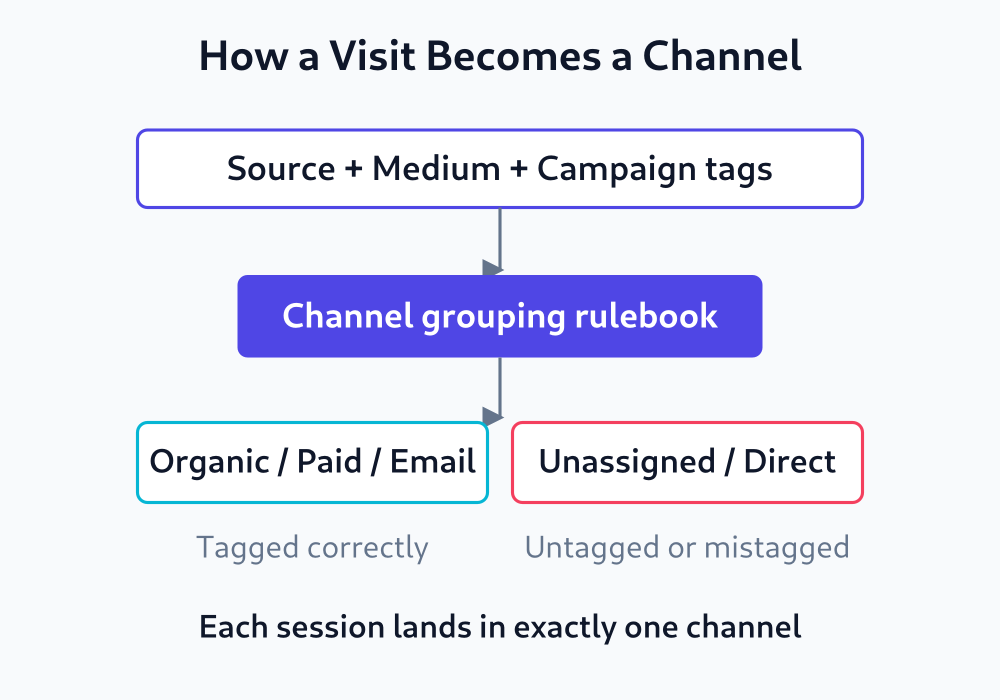
A channel is a category of traffic that shares an acquisition method — all your search-engine visits, all your email visits, all your paid visits. Channel grouping is the logic that assigns each session to exactly one channel, using the signals attached to that visit.
In Google Analytics 4, the primary signals are source (where the visit came from, like google or newsletter) and medium (how it arrived, like organic, cpc, or email). The grouping reads those two fields and decides the channel. Google publishes the full rule set in its default channel groupings reference.
The critical insight: the channel is derived, not collected. Analytics does not know a visit is “Email.” It infers it because medium equals email. Break the input and you break the channel.
How the Default Grouping Decides
The default grouping is a cascade of conditions. A session is tested against each channel’s definition in order, and the first match wins. A simplified view of the common channels:
| Channel | Matches when | Example source / medium |
|---|---|---|
| Organic Search | Medium is organic |
google / organic |
| Paid Search | Medium is cpc, ppc, or paid and source is a search engine |
google / cpc |
Medium is email |
newsletter / email |
|
| Referral | Medium is referral |
partner.com / referral |
| Direct | No source/medium and no referrer | (direct) / (none) |
| Unassigned | Nothing matched any rule | linktr.ee / (not set) |
Two buckets deserve special attention. Direct is where untagged, sourceless visits land — including a lot of traffic that was really something else. Unassigned is the failure bucket: it means a session carried a source or medium the rules did not recognize. A growing Unassigned channel is a tagging alarm, not a real audience.
Why Reports Disagree
Channel disputes almost always trace back to one of three causes. Naming them turns an argument into a fix.
- Inconsistent tagging — One campaign uses
medium=social, another usesmedium=paid-social, a third usesmedium=Socialwith a capital S. The default rules are case-sensitive on values, so these scatter across different channels. - Untagged links — A paid post with no UTM parameters arrives as Direct or Referral instead of Paid Social. The spend is real; the attribution is wrong.
- Custom channels nobody documented — Someone built a custom grouping with private rules, so their report and the default report describe the same traffic with different boundaries.
Most channel disagreements are tagging disagreements wearing a costume. Fix the inputs and the channels reconcile themselves.
Building a Channel Definition Standard
The cure for channel chaos is a single canonical document that everyone references. It does not need to be elaborate — it needs to be the only one.
Step 1: List your real channels
Write down the channels your business actually uses, not every channel that could theoretically exist. If you never run display ads, do not carry a Display channel. A short, honest list is easier to enforce.
Step 2: Define each channel’s exact rule
For every channel, state the precise source and medium values that qualify. “Email is any visit where medium equals email, lowercase, no exceptions.” Precision here is what makes two reports agree later.
Step 3: Standardize the values that feed it
Channels are only as clean as the tags behind them. Lock down a controlled vocabulary for medium — one spelling, one case — and tie it to your UTM naming conventions. This is where the standard actually lives or dies.
Step 4: Decide if you even need a custom grouping
Only build a custom channel grouping when the default genuinely mislabels your traffic — for example, if you run a channel the default does not model. Most teams do not need one. A custom grouping you forget to document just becomes the next source of disagreement.
When a Custom Grouping Is Justified
Custom groupings earn their keep in specific cases. If you run influencer campaigns that should be separated from generic referrals, or affiliate traffic that needs its own bucket, the default cannot express that nuance. There you define a custom rule — and, crucially, you record it in the same canonical document so the report is reproducible.
What you should not do is fork the grouping casually. Every additional definition is another thing that can drift out of sync. Keep custom rules rare, named, and owned, the same way you would treat any entry in your tracking plan.
Keeping Channels Honest
Channel grouping is not a set-and-forget configuration. Watch the Unassigned and Direct buckets the way you watch a smoke detector. When Unassigned grows, a new campaign shipped with an unrecognized medium. When Direct spikes around a launch, paid links probably went out untagged.
Review the grouping whenever you add a marketing channel, change an ad platform, or onboard an agency. The goal is simple and unglamorous: one definition, consistently applied, so every report tells the same story about where your traffic comes from.
Frequently Asked Questions
What is the difference between a source, a medium, and a channel?
The source is the specific origin of a visit, such as google or newsletter. The medium is the general method, such as organic or email. The channel is the named bucket — Organic Search, Email — that grouping rules assign based on those two values. Source and medium are collected; the channel is derived.
Why is so much of my traffic showing as Direct?
Inflated Direct traffic usually means visits arrived without a source, medium, or referrer. Common causes are untagged paid links, app-to-web transitions, and links pasted into documents or messaging apps. Tagging every paid and email link with UTM parameters is the single most effective fix.
What is the Unassigned channel in Google Analytics 4?
Unassigned is the bucket for sessions whose source and medium did not match any channel rule. It is effectively an error category. A rising Unassigned count means traffic is arriving with a medium value your grouping does not recognize, which points to inconsistent or non-standard tagging.
Should I edit the default channel grouping or create a new one?
For most teams, neither — fixing the tagging that feeds the default solves the problem. Build a custom grouping only when your business has a channel the default genuinely cannot represent, and document its rules so the report stays reproducible.

Marketing strategist turned measurement consultant. After 9 years bridging the gap between marketers who need data and analysts who need structure, I started WebStatsPolicy to make analytics standards accessible to everyone. Because good measurement shouldn't require a PhD — just clear rules and the right tools.