Analytics Data Retention Policy: How Long to Keep Your Data
Most teams set up their analytics data retention policy exactly once — when a dashboard prompt forces them to pick a number — and never think about it again. Then a year later someone needs a two-year trend, opens the report, and finds the data is simply gone.
Retention is not a checkbox. It is a governance decision that balances analytical need against storage cost, privacy obligations, and platform limits. Get it wrong in either direction and you either lose history you needed or hoard event-level data you were never allowed to keep.
Key Takeaways: An analytics data retention policy defines how long you keep raw, event-level data and how long you keep aggregated reports. In Google Analytics 4, event-level retention defaults to 2 months and can be set to 14 months. Aggregated standard reports are kept far longer. Decide retention per data type, document the reasoning, and export anything you need beyond the platform window before it expires.
What a Data Retention Policy Actually Covers
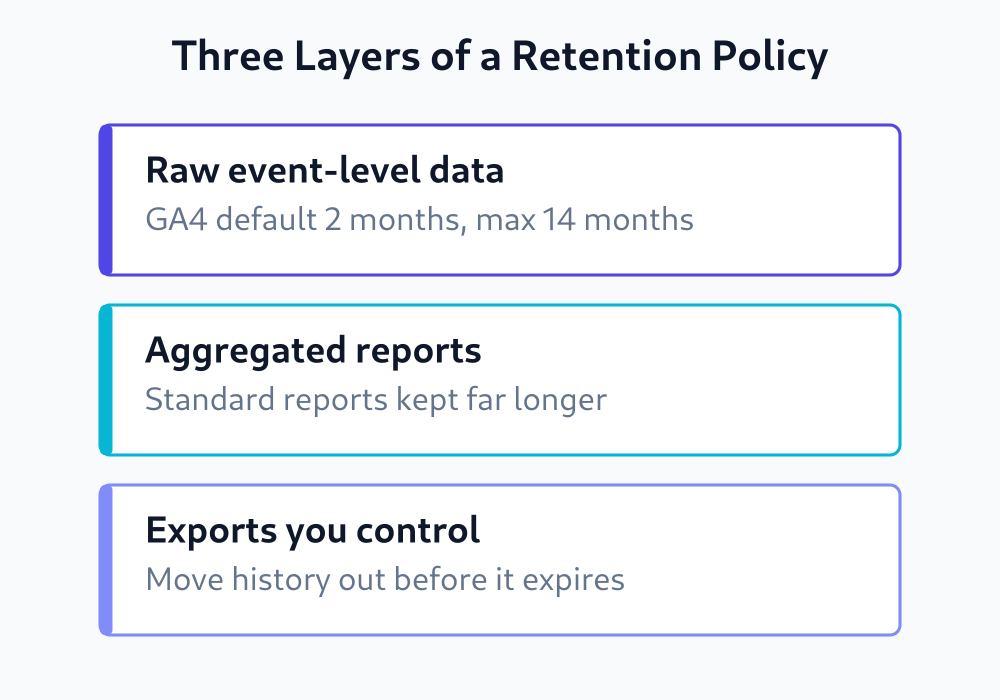
People hear “retention” and picture one slider. In practice a real policy covers three distinct layers, and each behaves differently.
Raw event-level data is the granular record — every individual event, with its parameters and user-scoped identifiers. This is the data that powers custom explorations and segment-level analysis. It is also the data most tightly governed by privacy rules, and the layer platforms expire first.
Aggregated reports are the rolled-up numbers: sessions per channel, conversions per week, users per country. Because they no longer contain individual records, platforms keep them much longer, often for the life of the property.
Exports and backups are copies you control — a BigQuery dataset, a warehouse table, a quarterly spreadsheet. Their retention is whatever your own policy says, which is exactly why exporting is the escape hatch when a platform window is too short.
| Data layer | Granularity | Typical platform window | Who controls it |
|---|---|---|---|
| Raw event-level | Individual events | 2–14 months | Platform setting |
| Aggregated reports | Rolled-up totals | Years | Platform default |
| Exports / warehouse | Whatever you load | Indefinite | You |
How Retention Works in Google Analytics 4
In Google Analytics 4, the setting that trips people up is event data retention, found under Admin then Data Settings then Data Retention. It controls how long user-level and event-level data stays available for custom exploration reports.
The default is a short window. Google’s own data retention documentation describes the two options for a standard property: roughly two months, or fourteen months. Most teams should switch to the longer window immediately, because the default quietly caps how far back your explorations can reach.
Here is the part that confuses everyone: standard aggregated reports — the ones in the left navigation — are not affected by this setting. Those keep working across long date ranges regardless. The retention slider only governs the granular, explorable layer. So a team can believe its data vanished when really only the event-level detail expired, while the aggregate totals are still intact.
The retention setting controls explorations, not standard reports. If your year-over-year line chart still works but a custom funnel suddenly stops at two months, retention is almost always the cause.
The Trade-offs You Are Actually Balancing
A retention policy is a negotiation between four pressures. Naming them makes the decision defensible instead of arbitrary.
- Analytical need — Seasonal businesses need at least 14 months to compare one peak to the next. A weekly-cadence SaaS product may need less granular history.
- Storage and cost — Granular data in a warehouse is not free. The longer and finer you keep it, the more it costs to store and query.
- Privacy obligation — Many data-protection frameworks expect you to keep personal data no longer than necessary for its stated purpose. Indefinite event-level retention is hard to justify.
- Operational risk — Every record you hold is a record you could leak. Shorter retention shrinks the blast radius of an incident.
There is no universal right answer. There is only a documented one. When a stakeholder later asks “why is our retention 14 months and not 2 years,” the policy should answer in one sentence.
Setting Your Policy in Five Steps
Step 1: Inventory what you collect
List the categories of data flowing into your analytics: page and screen views, custom events, e-commerce records, user properties. You cannot set retention per type until you know your types. A clean tracking plan gives you this inventory for free.
Step 2: Define the analytical horizon
For each category, ask the longest lookback a real report needs. Year-over-year comparison demands at least 13 months of granular data. Most weekly operational reporting needs far less. The horizon, not the default, sets your minimum.
Step 3: Set platform retention to match
Configure the platform window to cover your horizon. In Google Analytics 4 that usually means selecting the 14-month event-data option rather than the default. Do it early — retention changes are not retroactive, so months lost under the default never come back.
Step 4: Export anything that outlives the window
When your analytical horizon exceeds the platform’s maximum, the answer is an export pipeline. Streaming events to a warehouse, or scheduling a regular aggregated export, moves the data into storage you control. Google documents the BigQuery export for GA4 for exactly this purpose.
Step 5: Write it down and review it
Record the retention value for each data category, the reason behind it, and the owner. Review the document when regulations change, when storage costs spike, or when a new report needs deeper history. Pair it with your broader tracking governance so retention is not an orphan setting nobody remembers.
Common Retention Mistakes
In my experience, the same three errors show up again and again.
The first is leaving the default in place. Teams assume the platform keeps everything forever, then discover the granular window was two months all along. The second is over-retention: keeping raw, user-level data indefinitely “just in case,” which creates privacy exposure with no analytical payoff. The third is treating retention as a one-time setting instead of a living policy, so it never gets revisited when the business or the rules change.
Set retention to your real analytical horizon — not the maximum, and never the default. Export what needs to outlive the platform, and delete what you cannot justify keeping.
Frequently Asked Questions
Does changing data retention delete my historical reports?
No. Standard aggregated reports are unaffected by the event-data retention setting. Only the granular, user-level data used in custom explorations is governed by the window. Your high-level trend reports continue to work across long date ranges.
Is retention applied retroactively when I increase it?
No, and this is the costly part. If you collected data under a two-month window, extending to fourteen months does not recover the months already expired. It only changes the window going forward, which is why setting the correct value early matters so much.
How long should I keep raw event data?
Keep it as long as a genuine report needs it and no longer. For most teams that means matching the platform’s maximum granular window — around 14 months — so year-over-year analysis is possible, then relying on aggregated reports and warehouse exports for anything older.
Where should long-term analytics history live?
In storage you control, such as a data warehouse. Platform retention windows are designed for operational analysis, not archival. If you need multi-year granular history, export the events into your own warehouse and apply your own retention rules there.

Marketing strategist turned measurement consultant. After 9 years bridging the gap between marketers who need data and analysts who need structure, I started WebStatsPolicy to make analytics standards accessible to everyone. Because good measurement shouldn't require a PhD — just clear rules and the right tools.